 sok’s notes
はじめに
自分の職場はGoogleWorkspaceがメインなので,タスクを GoogleTasksにいれてカレンダーで管理。しかしプライベートのタスクはNotionメインで運用。
Notionには仕事関係のものも入れたりしているのでNotionを見る頻度が多いことを考えるとNotionでタスクも見たいなとずっと思ってました。
デイリーログ用に毎日の定期予定作成をZapierを使っているのでこれ使おうかなと思ったところ,フリープランだと月に使えるタスクは100件までと。デイリーログ作成で30使っているので残り使えるのは70ほど。大小なんでもタスクに入れることが多い自分にとっては月70は少ないし,他にもZapier使いたいとなったときにもったいないなと。
ということで思い切ってGASを使ってGoogleTasksとNotionを連携することにチャレンジ。
やりたいこと
実装したいと思っていることは3つ。
-
GoogleTasksのタスクが追加されるとNotionにタスクを追加
- Notionに追加されるタイミングで仕事タグを追加
- GoogleTasksのタスクが完了になるとNotionのタスクのチェックボックスにチェック
- GoogleTasksのタスクが更新されるとNotionに追加されたタスクも更新
完成版
とりあえず実装したいと思っていた1(新規追加)と2(タスク完了)についてはできたので現状は満足。ただ,更新の部分についてはまだできていないのでこれからまた考えてみたいところ。
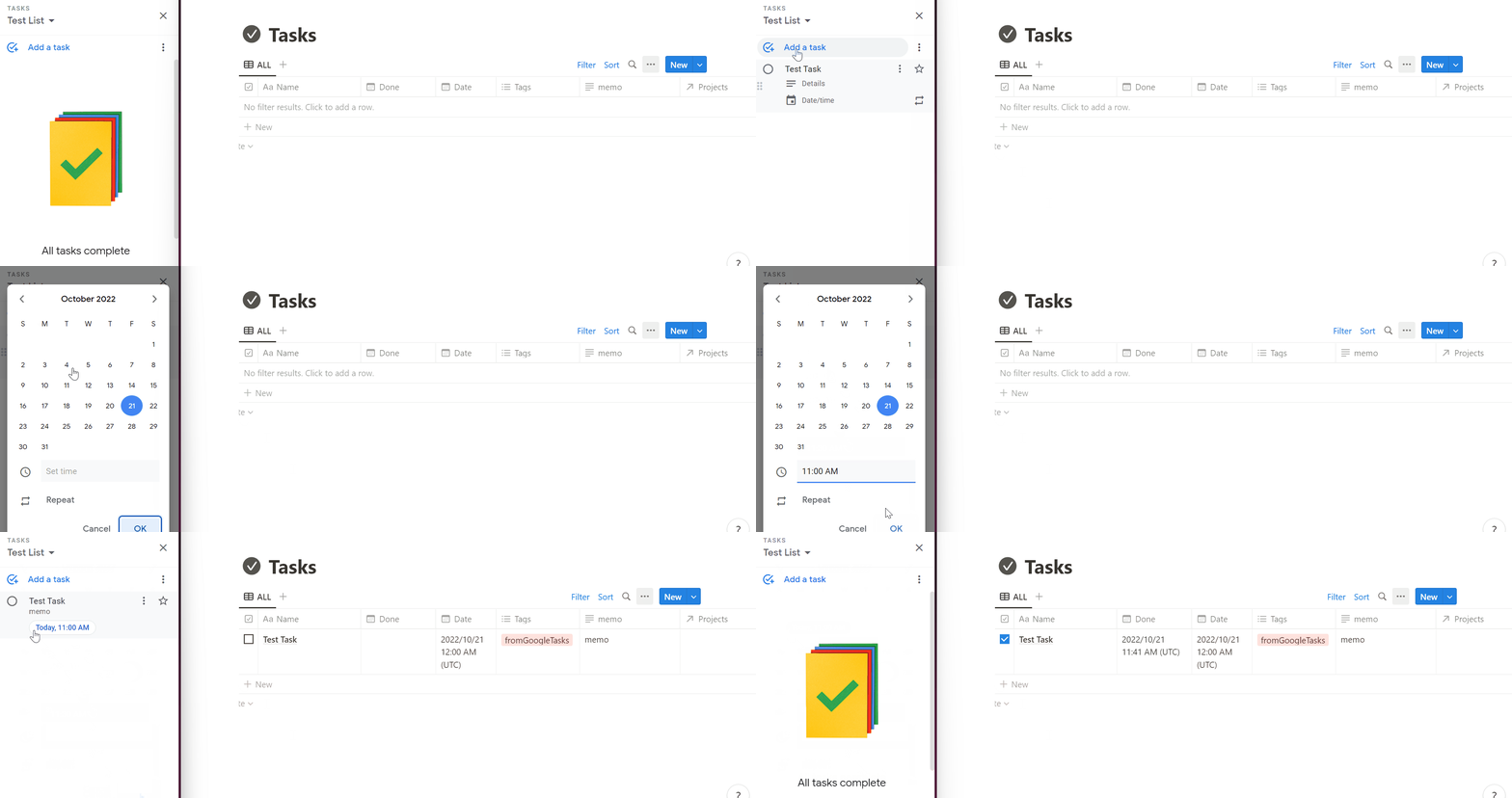
GAS
素人が書いたものなので汚い・わかりづらい・もっといい方法がある…などあるかと思うけど何かの参考になれば。
むしろこうした方がいいというアドバイスがあると嬉しいです。
GAS(クリックで開きます)
//=== Define variables =====//
const notion_token = "YOUR_NOTION_TOKEN";
const database_id = "YOUR_NOTION_DATABASE_ID";
const notionPrefix = "https://www.notion.so/";
const notionApi="https://api.notion.com/v1/databases/" + database_id;
const getUrl = 'https://api.notion.com/v1/databases/' + database_id + '/query';
const writeUrl = 'https://api.notion.com/v1/pages/';
const notionVer="2022-06-28";
//=== Define variables =====//

// === Run this Function ===//
function googleTaskToNotion(){
  const lists=Tasks.Tasklists.list().getItems();
  let table =new Array();
  for (let i=0;i<lists.length;i++){
    table=table.concat(getTasks(lists[i]));
  }
}

function getTasks(taskList) {
  const tasks = Tasks.Tasks.list(taskList.id).getItems();
  const table = new Array();

  let fromNoiondb=getResults();

  if (tasks) {
    for (let i = 0; i < tasks.length; i++) {
      let searchid =fromNoiondb.some(v => v.includes(tasks[i].id));

      if(searchid == false){
        let due = tasks[i].due ? new Date(tasks[i].due) : "";

        if(tasks[i].notes==undefined){
          tasks[i].notes=" "
        }

        toNotion(tasks[i].title,tasks[i].id,tasks[i].notes,due,"fromGoogle");
        console.log("Added new task:ID= "+tasks[i].id+" /Task title: "+tasks[i].title);
      } else {

      }

    }

  } else {
     Logger.log(`There are no task in${taskList.title}`);
  }

  let today = new Date();
  let notiontaskcount=fromNoiondb.length;

  for(let j =0;j < notiontaskcount; j++){

    var found = tasks.find(e => e.id === fromNoiondb[j][1]);

    if(found==undefined && fromNoiondb[j][3]==false){

      doneNotion(fromNoiondb[j][0],today);
      console.log("Done task: ID="+ fromNoiondb[j][1]+" / task name:"+ fromNoiondb[j][2]);
    }else{

    }
  }
  return table
}

function toNotion(name,taskid,note,date,tag) {

  var headers = {
    'Content-Type' : 'application/json; charset=UTF-8',
    'Authorization': 'Bearer ' + notion_token,
    'Notion-Version': notionVer,
  };

  var post_data = {
    'parent': {'database_id': database_id},
    'properties': {
      "Name": {
        'title': [
          {
            'text': {
              'content': name,
            }
          }
        ]
      },
      "taskid": {
        "rich_text": [
          {
            "type": "text",
            "text": {
              "content": taskid
            }
          }
        ]
      },
      "memo": {
        "rich_text": [
          {
            "type": "text",
            "text": {
              "content": note
            }
          }
        ]
      },
      "Date": {
        "date": {
          "start": date
        }
      },
      "Checkbox": {
        "checkbox": false
      },
      "Tags": {
        "multi_select": [
          {
            "name": tag
          }
        ]
      }
    }
  };

  var options = {
    "method" : "post",
    "headers" : headers,
    "payload" : JSON.stringify(post_data)
  };
  return UrlFetchApp.fetch(writeUrl, options);
}

function doneNotion(notiontaskid,donedate) {
  let url_3= writeUrl + notiontaskid;

  var headers = {
    'Content-Type' : 'application/json; charset=UTF-8',
    'Authorization': 'Bearer ' + notion_token,
    'Notion-Version': notionVer,
  };

  var post_data = {
    'parent': {'database_id': database_id},
    'properties': {
      "Done": {
        "date": {
          "start": donedate
        }
      },
      "Checkbox": {
        "checkbox": true
      }
    }
  };

  var options = {
    "method" : "patch",
    "headers" : headers,
    "payload" : JSON.stringify(post_data)
  };

  return UrlFetchApp.fetch(url_3, options);
}

function getResults(){
  let headers = {
    'content-type': 'application/json; charset=UTF-8',
    'Authorization': 'Bearer ' + notion_token,
    'Notion-Version': notionVer,
  };

  let options = {
    'method': 'post',
    'headers': headers,
    "muteHttpExceptions": true
  };

  let notion_data = UrlFetchApp.fetch(getUrl, options);
  notion_data = JSON.parse(notion_data);


  let data = notion_data;
  let results = data.results;
  let taskall =new Array();

  results.forEach((item) => {

    let taskids =new Array();
    let taskid = item.properties.taskid.rich_text[0];
    let taskname =item.properties.Name.title[0];
    let itemid = item.id;
    let itemcheck =item.properties.Checkbox;

    if(taskid!==undefined){
      taskids.push(itemid);
      taskids.push(taskid.plain_text);
      taskids.push(taskname.plain_text);
      taskids.push(itemcheck.checkbox);
      taskall.push(taskids);
    }
  });

  return taskall;
}
最後に
こんなことができるのならと、Zapier使っていたデイリーログページの自動作成もGASで書いた。これまでの経験が十分活きて30分で作成完了!
やりたいことを自分で実現できるともっとやってみたいなと思うので何かあったらまた頑張ってみようと思う。
おわり🙂